
Crochet Pricing Calculator Free Download
This post may contain affiliate links. If you make a purchase through links on our site, we may earn a commission.
I often see posts throughout the crochet community asking about how to calculate the costs of your handmade crochet items. There are always a wide range of responses and discussions on these kinds of questions. That’s why I created this crochet pricing calculator!
In this post we are going to talk about common pricing methods, and my alternative for profitable crochet pricing for your crochet business. I will also provide you with a free crochet pricing calculator tool that will help you price your items, and your time!
Table of Contents
Other Pricing Methods
3x Cost of Materials
If you’ve ever seen a pricing post in a crochet Facebook group, I’m sure that you’ve seen well-meaning people suggesting to charge the cost of your materials, multiplied by 3.
First, let me explain why this method is not the best choice if you are truly trying to earn a profit and create a sustainable business. Here are a few examples:
Scenario 1
Let’s say that I’m making a hat in one solid color using a worsted weight yarn. It requires about 110 yds of yarn, which is usually less than one skein. I purchased one skein of Brava Worsted yarn, which is only $3.99 per skein, with a total of 218 yards. The total cost in yarn for this hat is then $3.99. Using this pricing method, I should charge $11.97 for this hat, which leaves me a profit of $7.98.
However, this hat took me 2 hours to make. That means I’m only making $3.99 per hour!
Scenario 2
In this example, let’s say I’m making an amigurumi that only requires 2 colors of worsted weight yarn. I purchased 2 skeins of Brava Worsted yarn, for a total of $7.98. Using this pricing method, that means I should charge $23.94, and would have a profit of $15.96.
However, this doesn’t factor in the cost of safety eyes, stuffing, and anything else that might be used. Not to mention that amigurumi is generally always more time consuming. If this amigurumi took me 5 hours to make, I’m only making $3.19 per hour!
I don’t know about you, but I think that my time is worth more than that.
Exceptions
As with everything, there are exceptions to every rule. I will say that if you do not have any intentions of crocheting for a profit, this 3x materials method may work out for you. If you just want to cover the cost of your yarn and make a few dollars to purchase more yarn, this might be the right fit for you.
Pricing Per Stitch
I’ve seen others suggest pricing per stitch. This sounds like it would work out in theory, provided you set the per stitch rate appropriately; however, I don’t want to try to do the math on how many stitches are in a project, especially for something like an amigurumi project!
Profitable Crochet Pricing Calculator Method
My crochet pricing formula is built into my calculator tool. Using my crochet pricing calculator, we will take the same details in scenario 1 above, and see what price we come up with.
*Note: This crochet pricing calculator has recently been updated to include a Google Sheets option, as well as the original Microsoft Excel option. The tutorial screenshots below are from excel. The calculators both work the same, but the formatting appearance is slightly different in Google Sheets.
Hourly Rate
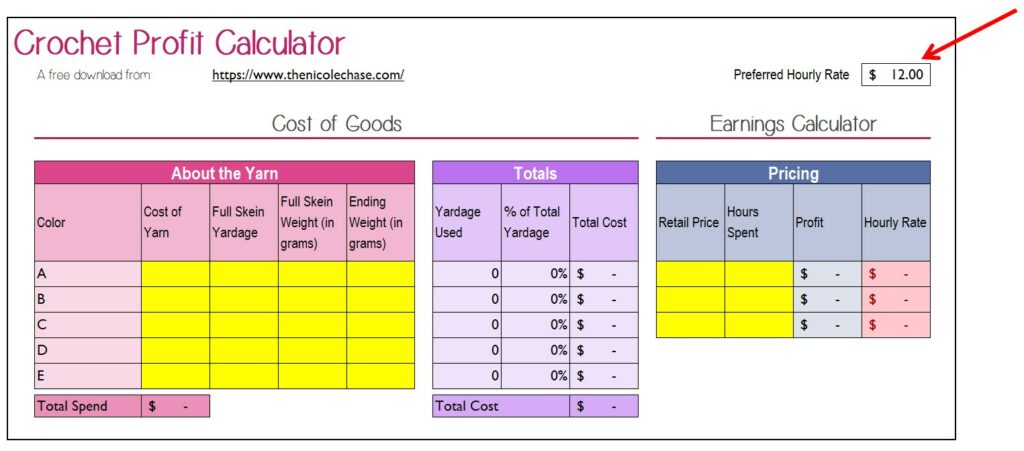
Your first step to using the crochet pricing calculator is to first decide what your ideal hourly wage is. This may change for you over time, or even based on the project.
For this example, I’m going to use $12 for my hourly rate.
Insert your hourly rate in the designated box.
Yarn Details
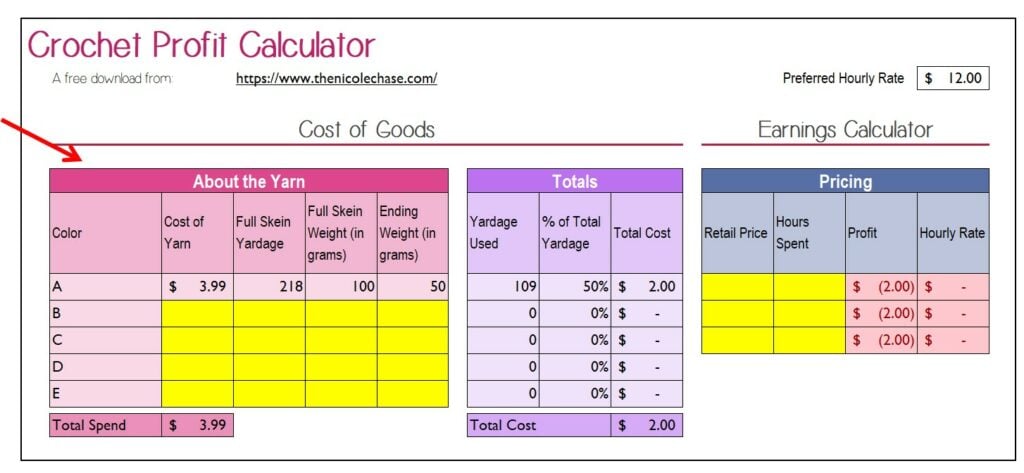
Next you’ll need to enter in the details of your yarn in the pink section.
If you don’t have the exact weight information, feel free to leave the ending weight blank, and the calculator will use the entire skein for your calculation.
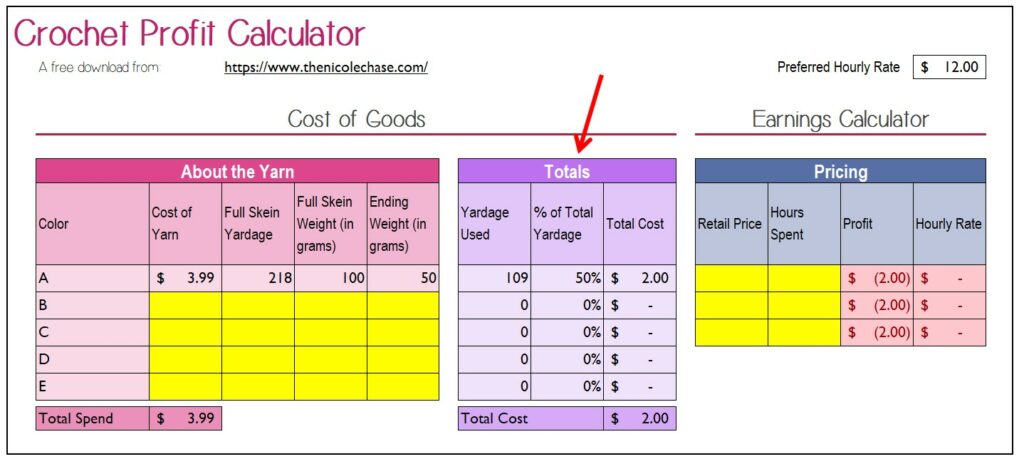
The purple section will automatically calculate. Here you will see the total yardage used in your project, as well as the total cost of that yardage.
Your Time
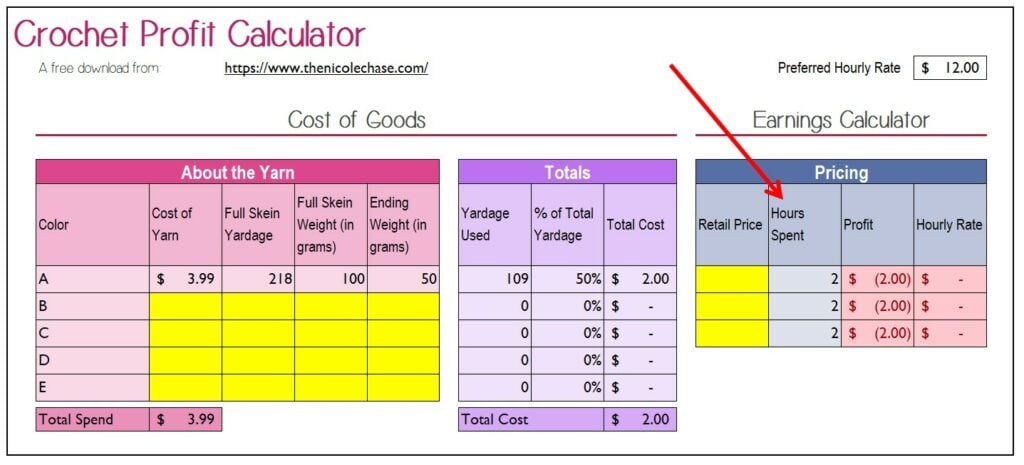
Next you’ll need to add in the amount of time you spent working on the project.
Notice that there is more than one row for this. This is so that you can compare different pricing scenarios side by side.
Set the Price
The final step is to play around with the crochet pricing formula. I’ve entered a few different options, starting at $15.
As you can see in the $15 scenario, I would only be making $6.50 per hour, which is below my preferred hourly rate, so the calculator shows that in red.
The next scenario, selling the hat for $25, I would be making $11.50 per hour, with a profit of $23.01. This is pretty close to my hourly rate, but we can do better.
Of course the best scenario would be selling the hat for $30, which would leave me with a profit of $28.01, making $14.00 per hour.
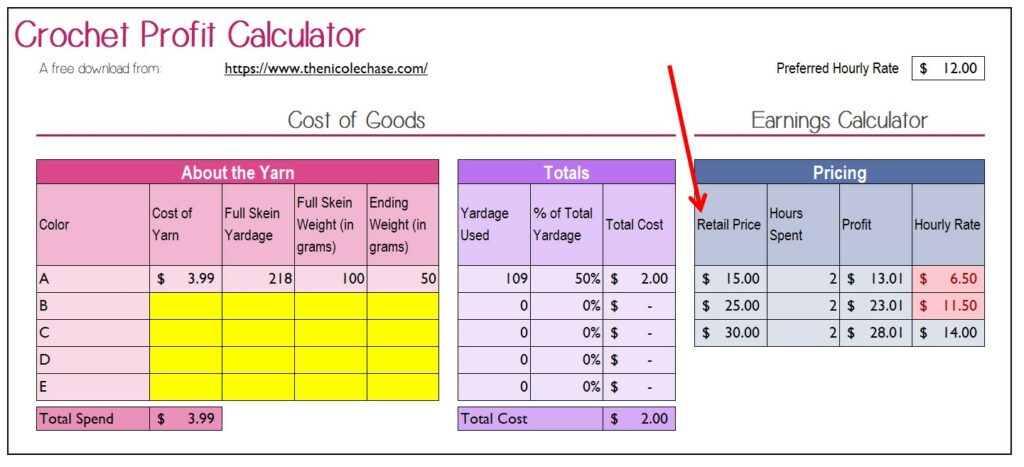
I find it really helpful to see these comparisons side by side. Sure, in the first scenario, a profit of almost $13.01 sounds fine, but not when you break it down with the hourly rate.
Time Tracking
Of course if you are going to be charging based on your time, you’ll need to be able to accurately track the amount of time that you spend on a project. Whether you simply keep an eye on the clock as you work, track your time with pencil and paper, or use an app.
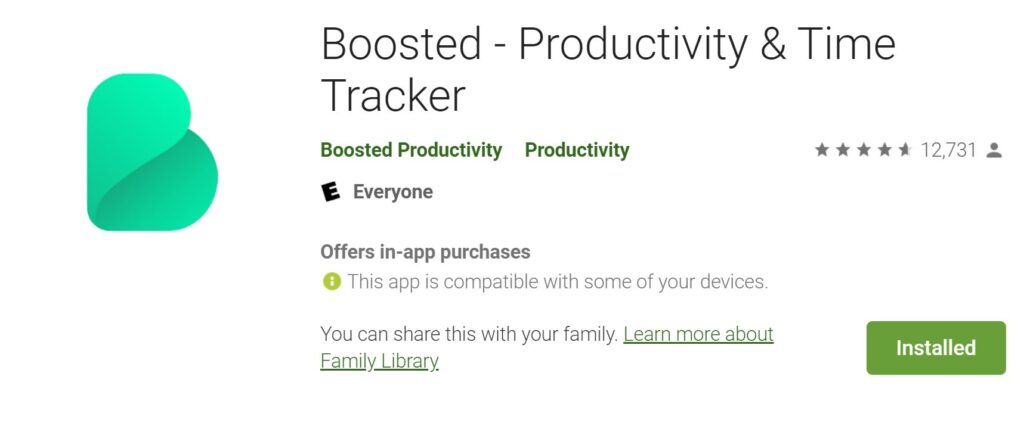
I personally use an app called Boosted to keep track of the time spent on each project. You can download it from the Google Play Store for free.
Other Material Costs
If you’re making things like amigurumi that require stuffing, or perhaps making items that require buttons, safety eyes, etc., you’ll want to factor the cost of those items into your price as well. Simply add those material costs to the total price that you decide on using the crochet pricing calculator.
Orders and Payments
I use two different apps to help keep my orders and payments organized. The first is Etsy. If you are doing any kind of shipping, I highly recommend you set yourself up with an Etsy shop. You’ll save so much money in postage by printing labels directly from them, and their order management system is quite nice. You can easily see open orders, and mark an order as shipped or complete. If you sign up using my affiliate link, you’ll get 40 listings free! (and so will I!)
The next app that I’d recommend is Square. Square is essential if you are going to be doing any in-person sales! You can get a free card reader that connects directly to your phone. This allows you to accept credit and debit cards wherever your set up! I also like to use Square for taking deposits on large orders. You are able to customize invoices so that a certain amount is due immediately, while the remainder is due upon completion of the order. If you sign up for your free Square account using my affiliate link, you’ll get free processing on up to $1000 in sales over 180 days! (and so will I!)
Accounting
I personally have a separate bank account for my business. While this isn’t necessary as a sole proprietor, I just like to keep everything clearly organized. I also find it super helpful to keep track of all of my business related income and expenses throughout the year, rather than collecting a pile of receipts to sift through at tax time. I have tried several different programs, some free, and some paid. I currently use Wave, and I really like it. But I did use excel for many years. Perhaps I will share a blank version of my bookkeeping spreadsheet in the future. Leave me a comment if you’d be interested in that!
And now, on to what you came here for…
Microsoft Excel vs Google Sheets
This crochet pricing calculator will only work in the program that it was designed for (Microsoft Excel or Google Sheets). The versions are not interchangeable and can’t be used across both programs.
It is very important that you only enter data into the spaces that are highlighted in yellow.
Microsoft Excel
If you accidentally delete a formula and it can’t be undone, no big deal! Just come back over to the blog and download a fresh copy.
Google Sheets
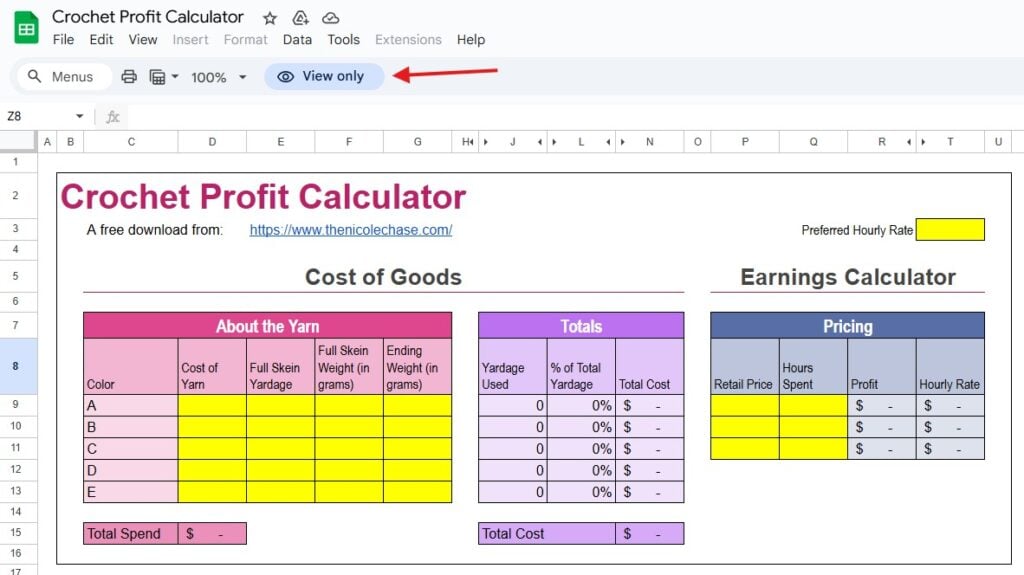
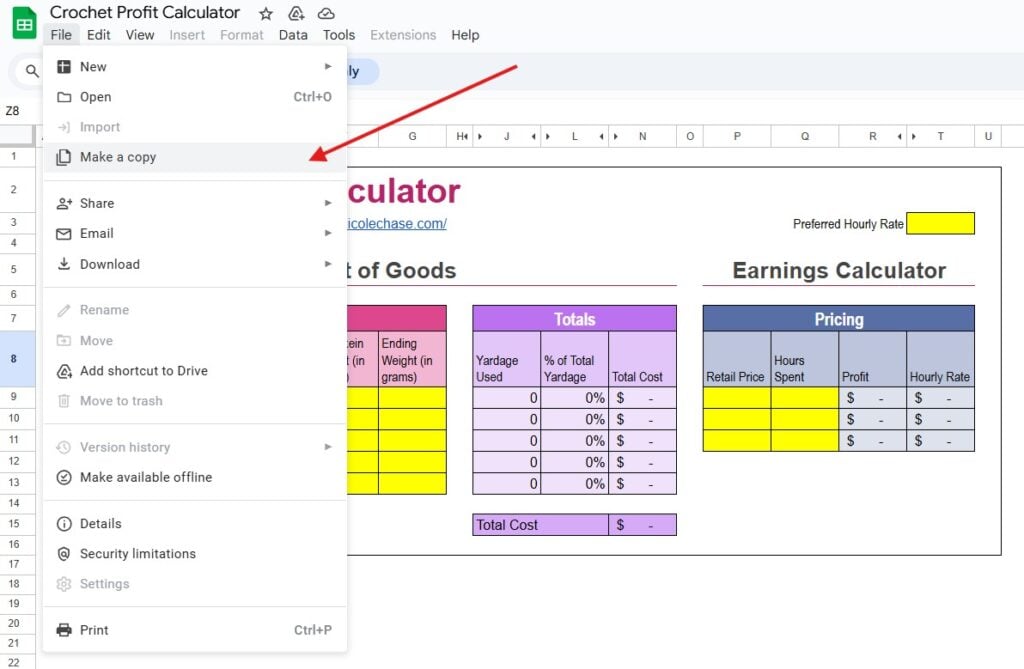
When you open the Google Sheets version, you will be seeing a “view only” copy. You will not be able to make edits to this copy.
You will first need to make a copy to save for yourself. You can do this by selecting File > Make a copy, as shown below.
Get the Free Download
There are of course other factors to consider when pricing your items, such as the cost of your tools, packaging, marketing, etc. If you have a lot of other outside expenses, you should consider changing your hourly rate to something a bit higher, to help in offsetting those other cost factors. I hope that this crochet pricing calculator helps you grow your handmade business and earns you a fair wage!
Download your Crochet Profit Calculator for free by signing up for my newsletter below!
Get the Freebie!
Sign me up to the newsletter and give me the download for the Crochet Profit Calculator spreadsheet!
*Note: This crochet pricing calculator has recently been updated to include a Google Sheets option, as well as the original Microsoft Excel option. Opening the Excel version in Google Sheets WILL NOT WORK PROPERLY. Opening the Google Sheets version with Microsoft Excel WILL NOT WORK PROPERLY.

More Crochet Business Resources
I hope that this free crochet pricing calculator is a helpful tool in selling your crochet items, making a profit, and growing your handmade business! You may also enjoy my yarn inventory tracker download.
I hope you enjoyed this post! Be sure to leave me a comment below to let me know what you think.
Want to see more from me? Be sure to subscribe to my email newsletter so that you never miss a post!
Follow along with me on Instagram for daily updates and a behind the scenes look at my designs.
I’d love to see what you make with this tutorial! Don’t forget to share your finished work with me: on social media by tagging me @thenicolechase, in your Ravelry projects, or post over in my Facebook group!
Thanks for stopping by! Happy crafting!
Nicole
PATTERN COPYRIGHT © 2026 NICOLE CHASE. ALL RIGHTS RESERVED.
PATTERN MAY NOT BE ALTERED, COPIED, REDISTRIBUTED OR SOLD AS YOUR OWN PATTERN.
YOU MAY SELL THE FINISHED PRODUCT ON A SMALL SCALE. PATTERN/DESIGN CREDIT GIVEN TO WWW.THENICOLECHASE.COM IS APPRECIATED. PERMISSION TO SELL DOES NOT INCLUDE MASS PRODUCTION. LARGE SCALE PRODUCTION IS PROHIBITED.
PHOTOGRAPHY COPYRIGHT © 2026 NICOLE CHASE. ALL RIGHTS RESERVED.
PHOTOS MAY NOT BE ALTERED, COPIED, REDISTRIBUTED OR SOLD AS YOUR OWN.
This post may contain affiliate links. If you make a purchase through links on our site, we may earn a commission.
What if you don’t know the full skein yardage because you are starting a project with a partial skein?
Hello! You can weigh the yarn before you start so that you are able to figure out how much you used, and then adjust what you put in for the ending weight, so that the math still works out for the yarn you actually used on that project. Hope that helps!
Hi,
Your formulas must be the wrong way round. it works fine for ending weight when its 50g of 100g used because the answer will always be the same, but if you put it to 80g used of 100 then it works out the total cost cheaper? and shows you used 20% instead of 80%. and using a full skein 100g costs 0… Makes you wonder did you even actually use this to price your work
Hello,
The formulas are correct. It seems that you are just misunderstanding how to use it. In the “About the Yarn” section, the idea is to add the details for what a full skein yardage/weight is, and then the ENDING weight of the skein. Meaning, how much of the skein is remaining after you’ve used it. This is not the amount you used. It is meant to eliminate the user needing to do any of the math.
The “Totals” section then displays the information relating to how much you used.
I can assure you that I, and many others, use this very tool to price their work and have no issues. 🙂
Have a great day!
I have always struggled with how to price items. I do a lot of items for donations, usually c2c afghans, I average around 40-45 hours per afghan. I don’t always get asked for the fair market value, but when I do, this calculator was the best. So easy to use and really lays it all out for you. Thank you!
I’m so glad to hear that it is helpful for you!
I just signed up to get the calculate, but i’ve waited awhile and I still have not received it. I checked my spam and it was not there either,
Hello!
I’ve just checked and the email was sent to you at 9:39am EST today. It is showing as sent and not bounced. The email subject is “Your crochet profit calculator download!” and would have come from hello@thenicolechase.com.
If you still aren’t finding it, send me an email and I will respond to it with the download to be sure that you are able to receive a response. 🙂
Thanks!
How do I use it with Indian currency ??
Please help
You would have to change all of the cost related columns to be formatted in that currency.
Thanks alot. ????
The calculator is of great help.
I clicked on the link in your most recent newsletter. It brought me here, but I cannot find the link for the calculator. ???? The one link is to Pinterest which links back to here.
Please help!!!
The download is at the bottom of the article under the “Get the Free Download” title. You just enter your email and it will be sent to you. 🙂
NVMD – I got it! ????
Thank you for the calculator! I know it will help me get ready for market! ????
Hello, Is there a new link for the download? I keep getting an error when downloading.
So sorry about that! I’ve fixed it now. 🙂
Nevermind 🙂 husband to the rescue
Hello. I’m having trouble with it not auto calculating in the purple last column in "total cost". I have tried opening in microsoft excel spreadsheets and it won’t open at all. It will only open in google sheets. Do I need to open in another spreadsheet? Is there a formula I can input? Please help! Thank you!
Hello! This spreadsheet does not work in Google Sheets; some of the formulas do not translate there. When you open in excel, you must enable editing in order to be able to use the download. You will need to have one entire row in the pink box filled in for the purple box to populate. Hope that helps! .
Hello! having a bit of an issue. It’s not calcauting the total cost of goods or showing me the hourly rate after filling everything in
Hi! Are you using the sheet in excel or another spreadsheet reader? This form was created and meant to use in excel, so it may not translate to other programs. If you are, be sure that at least one full row of the yellow boxes have been completed so that no yellow boxes remain.
Hi, I’ve just subscribed to your newsletter but I’m having trouble looking for the downloadable link for the profit calculator. Hoping you could help. Thanks
Hello! The link to download shows up in the same box immediately after you subscribe. 🙂
Thank you for making the calculator available. I have one question though, it does not want to calculate the cost. It just stays blank. Am I doing something wrong?
Hello! It doesn’t calculate the price of the item, it allows you to decide a price based on what you want to be paid per hour. You must fill in the yellow box for hourly rate and at least one full line of yellow in the pink box. Then in the blue pricing box, you can put in various pricing scenarios, along with the number of hours it took you to make the piece. It calculates your hourly rate and amount of profit for each pricing scenario. If you refer to the instructions in this post, it walks you through each step. 🙂